FWF Ledger · the companion app
One flat price. A free tier that stays.
No slider, no success fees, no surprise renewal, and no card to start. FWF Ledger — which plans your way out of debt to a dated finish, tracks net worth with history you can correct, budgets from your real transactions, and reports what the borrowing actually cost you — has two tiers, both printed below to the cent, along with what apps like this typically cost, because a price only means something next to the going rate.
What’s in each tier
Every row, itemizedFree
$0.00
Permanent · no card, ever
Paid
$9.99/mo
or $83.99 a year — save 30%
Founder rateThe first 500 subscribers pay $69.99/yr and keep that price for as long as they stay subscribed. Not an intro rate that snaps back.
| Feature | Free | Paid |
|---|---|---|
| Tracking | ||
| Net worth tracking, synced across devices | Included | Included |
| Quick-add balances (about five seconds) | Included | Included |
| Works offline — entries sync when you’re back | Included | Included |
| Editable, backfillable history Fix a wrong number from three months ago. Most apps won’t let you. | Included | Included |
| Mark a purchase as planned, so a dip isn’t a scare | Included | Included |
| History kept Nothing is deleted on the free tier — older history is there waiting if you upgrade. | 12 months | Forever |
| Debt payoff | ||
| Avalanche and snowball, side by side | Included | Included |
| Your projected debt-free date, up front | Included | Included |
| How much of your income goes to debt Often called your debt-to-income ratio — and where yours sits against the bands mortgage lenders actually use. | Included | Included |
| How much of your card limits you’re using Often called credit utilization. Per card and overall, with the amount that would bring the worst one down. | Included | Included |
| Custom payoff order, with its honest cost | Included | Included |
| BNPL plans as real debts Klarna, Afterpay, Affirm. Bank sync misses these; we don’t. | Included | Included |
| Variable-income planning Plan against the month you can always manage, not an average. | Included | Included |
| Goals and nudges | ||
| Savings goals, fed by an account you already track | Included | Included |
| Weekly check-in by email or push, opt-in Off until you turn it on, and only sent when something actually changed. | Not included | Included |
| Budgeting | ||
| 50/30/20 budgeting from your real spending Adjustable — 50/30/20 is a starting point, not a law. | Not included | Included |
| Move any transaction between categories And the rules you create are listed and deletable, not write-only. | Not included | Included |
| A note and a tag on any purchase Why that $80 was $80, and a tag that groups a trip or a shared bill across categories. Both come out in the CSV. | Not included | Included |
| Income smoothing for variable pay Budget from a multi-month average, with a self-employed tax set-aside. | Not included | Included |
| Subscription visibility What renews, when, and what it costs a year. We never negotiate for a fee. | Not included | Included |
| Reports | ||
| What your debts have cost you The interest you’ve paid, by year and across the whole record — money that never came off what you owe. | Not included | Included |
| Your payoff, month by month What you paid against what actually came off the balance, and the gap between the two. | Not included | Included |
| What came in, what went out, and what you kept Month by month, so a bad month can be told apart from a bad habit. Needs a connected account. | Not included | Included |
| Your December figures What your mortgage and student loan lenders reported for the year, in one place while you wait on their paperwork. Not a tax document, and not a copy of one. | Not included | Included |
| What changed in your history Every figure you corrected later, and what it said before — the one screen where the old number survives. | Not included | Included |
| Automation and sharing | ||
| Bank connections Read-only. We never see or store your bank login. | Not included | Up to 10 accounts, 4 banks |
| APR and minimum payment filled in from your bank No copying numbers off a statement. Anything you typed yourself is never overwritten. | Not included | Included |
| Household sharing No per-seat charge, and each person picks what to share account by account. | Not included | Up to 5 people |
| Your data | ||
| Full export (JSON + CSV), any time | Included | Included |
| CSV import | Included | Included |
| Delete your account for real, immediately | Included | Included |
| Two-factor by authenticator app, or a passkey Your face, fingerprint or device PIN instead of a code. Never by text message. | Included | Included |
Nothing is deleted on the free tier — older history is waiting if you ever upgrade, and nothing you already had moves behind the paywall.
Manual entry is first-class on every tier — bank linking is optional, always. The “Save this plan in the app” link under any calculator result on this site opens FWF Ledger with your numbers already filled in, on either tier — and from there it’s a plan that keeps running, not a result you saved.
The free tier never asks for a card. Sign up free, use it as long as you like, and upgrade only if the paid features earn it. Upgrading lives in the app’s Settings; cancelling is one click in the same place, takes effect at the end of what you’ve paid for, and everything you entered stays yours — exported on the way out, or left in place on the free tier.
What it looks like
Real screens, demo household data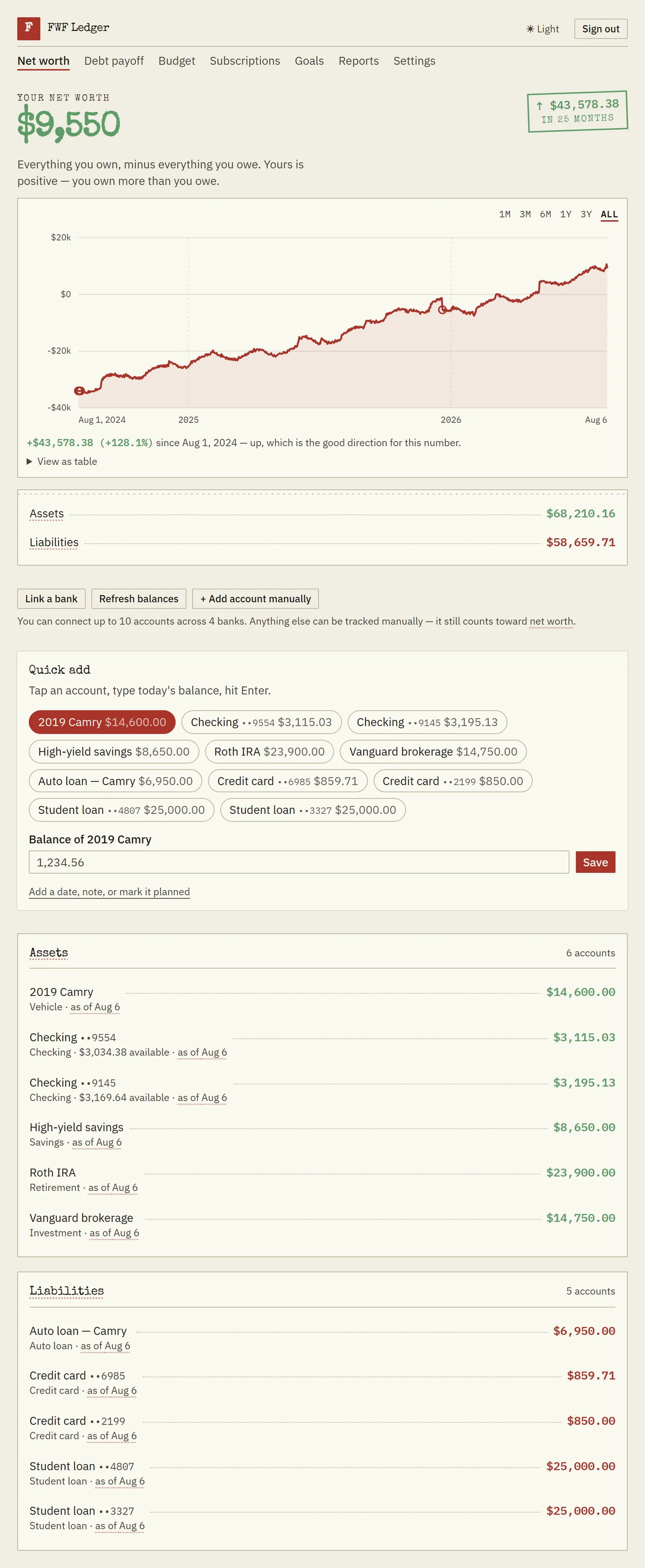
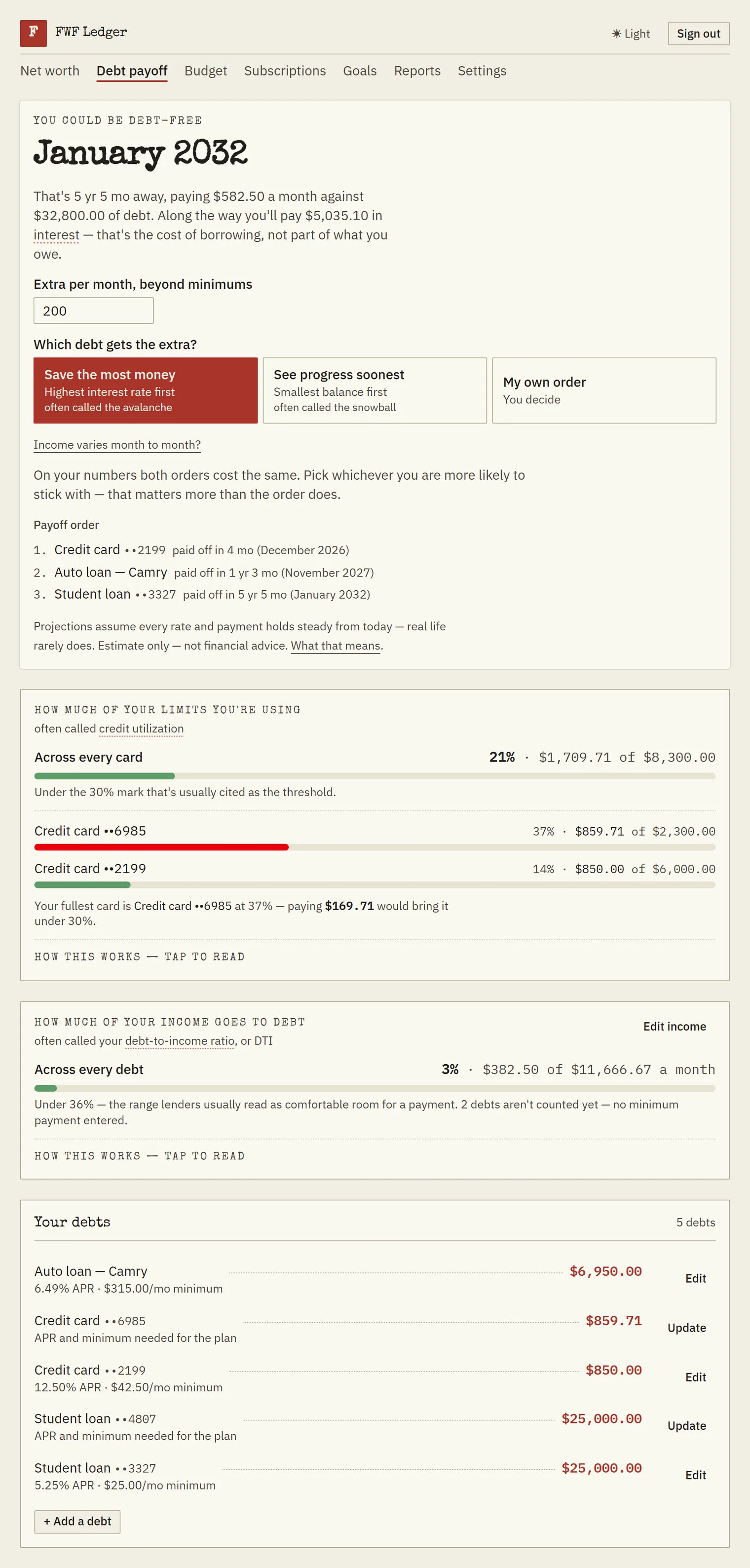
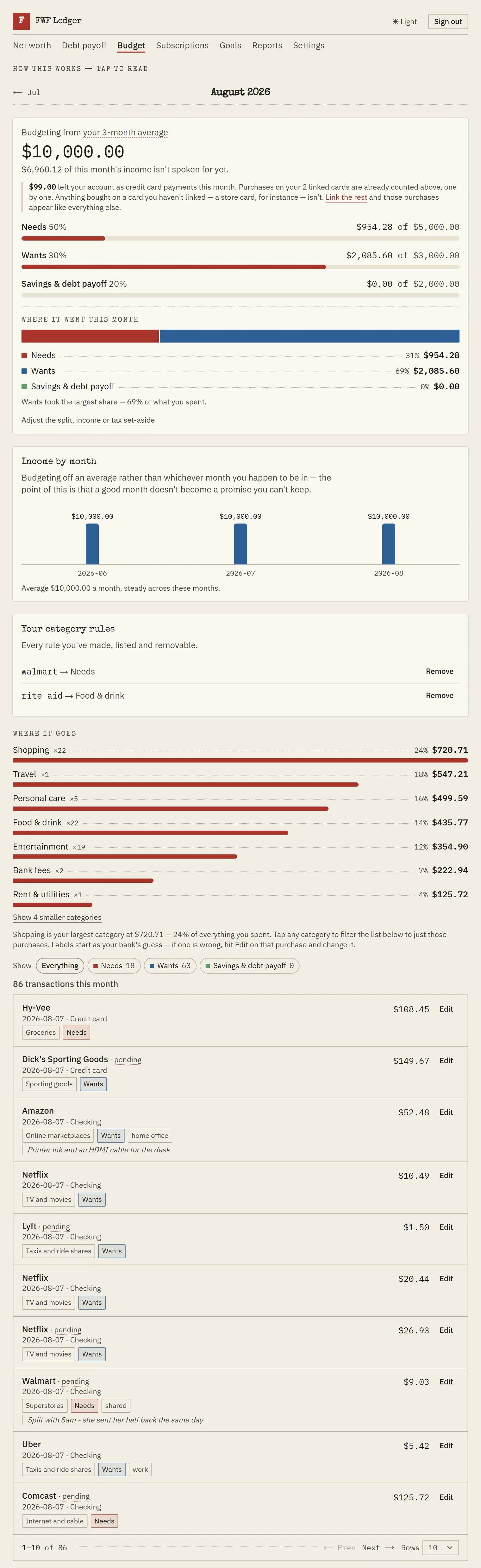
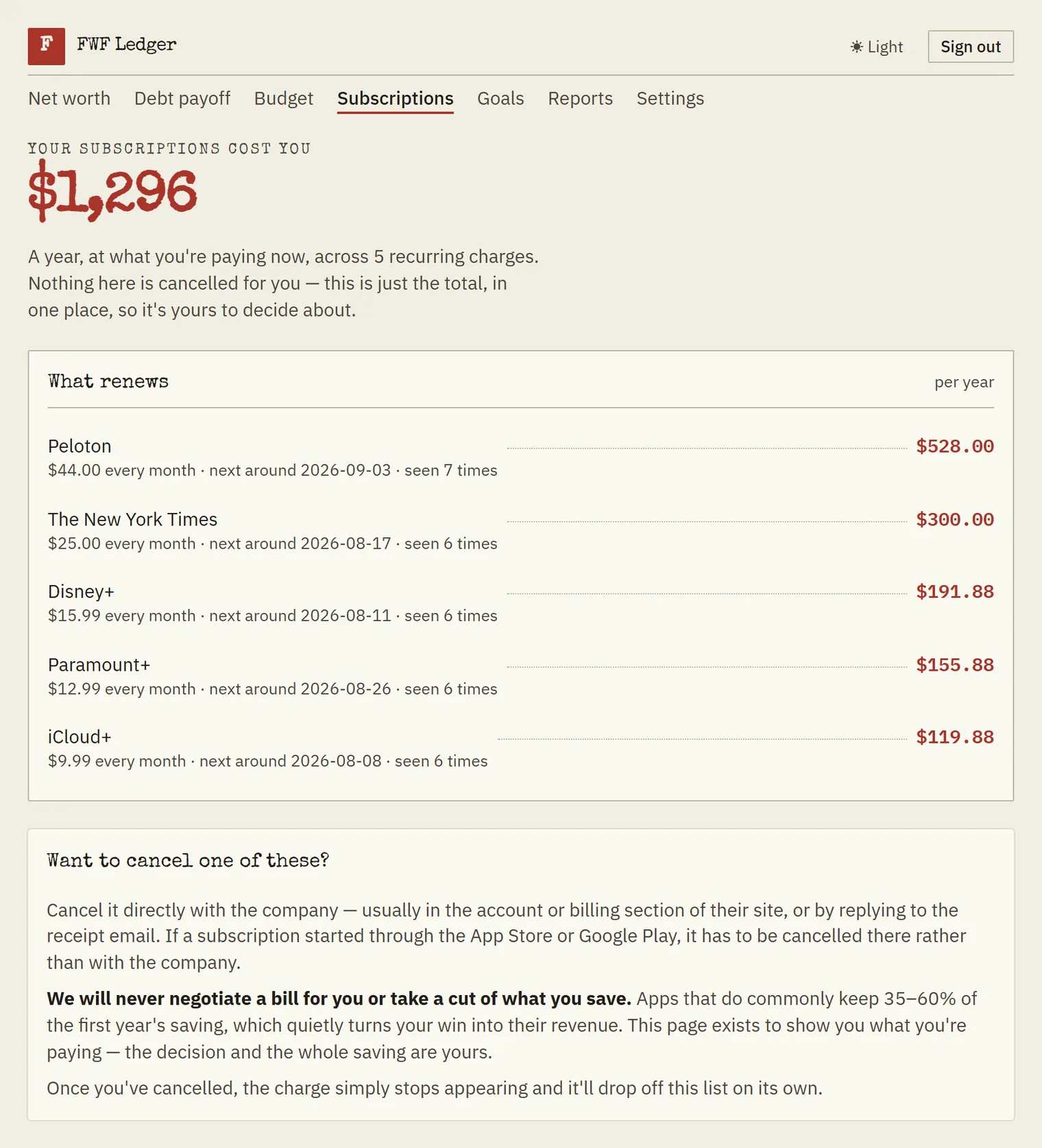
How that compares
Checked August 2026 · no names, on purposeTypical prices across the mainstream money apps as of August 2026, by category rather than by name — a table of competitors’ names goes stale the day one of them changes a price. Every category has a trade-off listed, including ours.
Swipe the table sideways to see every column →
| Kind of app | Typical price | Free tier | Second person | Trade-off |
|---|---|---|---|---|
| This app | $9.99/mo · $83.99/yr | Permanent, no card | Included, up to 5 people | No investment analysis, and no App Store app. |
| Full budgeting suites | $13–$14.99/mo · $95–$109/yr power tiers to $199 | Trials only, 7–34 days | Sometimes free, often extra per person | Comparable features for $3+/month more, with no permanent free tier to land on when you stop paying, and buy-now-pay-later plans stay invisible — bank sync can’t see them. |
| Bill-negotiation apps | $7–$14/mo plus a cut of savings | Limited | — | The success fee takes 35–60% of the first year of anything it negotiates down, so most of the win never reaches you. |
| Discount-priced trackers | ~$48/yr promotional; ~$72 at renewal | None | Usually single-user | The introductory price doesn’t survive the first renewal: about $48 becomes about $72, a rise you accept by not cancelling. |
| Spreadsheet-based trackers | ~$79/yr | None | Via the spreadsheet | Total control, and all the work: no real mobile entry, and every total and chart is one you build and maintain yourself. |
| Free aggregators | $0 | The whole product | Partial | Free because you’re the lead, not the customer — the balances you enter are what qualifies you for a call from someone selling advice. |
Where others come up short
Checked the same week as the prices, across the apps most people actually shortlist. Specifics, so you can go and check them:
- Interest and year-end figures are left to you to assemble. One desktop-lineage product ships a named tax report; everywhere else the year-end answer is something you build yourself out of a tag you remembered to apply and a filtered spending report. A student-loan interest total for the year we didn’t find in any of them, including that one. Here they’re named reports you open — what your debts have cost you in interest, and what your mortgage and student loan lenders reported for the year. They read what your lender reports through your bank, so they are not a copy of the lender’s own paperwork, and they can’t see an account you haven’t connected.
- The debt payoff planner costs nothing here. Avalanche, snowball, a custom order with its honest cost, buy-now-pay-later plans counted as real debts, a debt-to-income ratio, and a debt-free date — all on the free tier, with no card. Three of the five categories above have no permanent free tier at all, as their own column says: whatever planning they do is inside the subscription.
- A second person usually costs money. Household sharing for up to five is included at no per-seat charge, and each person picks what to share account by account. The discount and spreadsheet categories are single-user; the suites are split on it.
- Fixing a wrong number from three months ago. Most of these treat history as a log you append to rather than a record you correct. Ours is editable and backfillable, and there’s a report that shows every figure you changed and what it said before.
Competitor details were researched in August 2026 from published pricing pages, official help centres and user reports, and the capability notes above describe what those categories offered as of that date. Spotted something out of date? Tell us and we’ll fix it.
Where the others are better
A comparison table that only shows our wins would be marketing. Here is what you genuinely give up by choosing this one:
- Spending categorisation, out of the box. The established apps have had years to refine how they categorise spending, and it shows in the edge cases. Ours is new: the mapping is sensible and every transaction is one tap to move, but expect to correct more of it early on than you would in a product that’s been tuned since 2004.
- Investment analysis. We count what your brokerage is worth; we don’t analyse holdings, allocation or fees. The tiers that do sit around $199/year. It’s something we want to build — but it isn’t here today, and nothing on this page is priced as though it were.
- A native app. We run in the browser and install to your home screen, which covers offline entry and notifications — but there’s no App Store listing. Most apps at $95+/year ship real iPhone and Android apps — though at least one of them charges a couple for two separate subscriptions. One of our own is something we’re considering, with no date attached and nothing here costing a cent more on the strength of it.
- A long track record. The established names have been running for a decade or more. This is new, built by one person. That’s a fair reason to be cautious — which is exactly why exporting everything and deleting your account are one click each.
The questions worth asking
Is the free tier actually permanent? Yes. No time limit, no card, and whatever is free when you arrive stays free for you — nothing you already have moves behind the paywall afterwards. That commitment is written down, in those terms, on the app’s promises page, along with the free features it names. Go and hold us to it there.
What does “founder rate” mean exactly? It’s a promotional discount on the annual plan: $69.99 a year for the first 500 subscribers, against the standard $83.99 a year — and against the $119.88 twelve monthly payments come to, which is where the 41% figure comes from. Annual only; there is no discounted monthly price. It stays $69.99 at every renewal for as long as the subscription stays active, so it isn’t a first-year rate that snaps back. There’s no clock on it either: it ends when the 500th subscriber takes it, counted as an actual headcount in the billing system, which is written to turn away the 500th by mistake before it will let in a 501st. Lapse and resubscribe later, and the then-current price applies.
How do I cancel? In the app: Settings, one click. The paid features run to the end of what you’ve paid for, then the account continues on the free tier with your data intact. No retention flow, no chat with anyone.
What happens to my bank credentials? Account linking runs through Plaid; we never see or store your bank login, and linking is optional and removable. Everything works with manual entry.
What do you do with my data? Store it so the app works, and nothing else. No ads, no selling data, full export (JSON and CSV) on every tier, and account deletion that actually deletes. The app has its own privacy policy, shown in the app.
Who builds it? The same one-person operation behind this site (Kaivora LLC). Same rule as the site: no claims that can’t be backed with arithmetic.
Do I need any of this to use the calculators? No. Everything on financewithoutfluff.com stays free and account-free, whole and unchanged. The difference isn’t storage: a calculator answers one question once, and the app is where the answer becomes a plan you run — your actual debts in a payoff order you can rearrange and price, a debt-free date that moves as you pay, goals fed by accounts you already track, and, on the paid tier, budgeting built from your real transactions and reports on what the borrowing has cost you.
Where do these prices apply? Billing happens in the app, run by Kaivora LLC, same as this site. This is the only pricing page either of them has — the app links here rather than keeping a second copy that could drift. The figures you agree to are the ones on the checkout screen, so if this page and that screen ever disagree, the checkout governs and this page has a bug — tell us and we’ll fix it.
Start with the free tier
No card, no trial clock, no minimum commitment. If the paid features ever earn it, upgrading lives in Settings — we won’t chase you.
The pricing rules we’ve committed to — no surprise increases, no feature moving behind the paywall, cancellation that works — are spelled out on the app’s promises page.